
Repair, redesign or rebuild your NZ business website?
Not every outdated or underperforming website needs to be replaced. Sometimes a specific repair is enough. In other cases, the design, content or customer journey needs a rethink. A full rebuild only makes sense when the platform or underlying structure is holding the business back.
The right decision should not be based on the website’s age. It should be based on what is no longer working, what is still valuable and what the business needs the website to achieve next. In most cases, the best option is the least expensive approach that properly solves the problem without creating another one later.
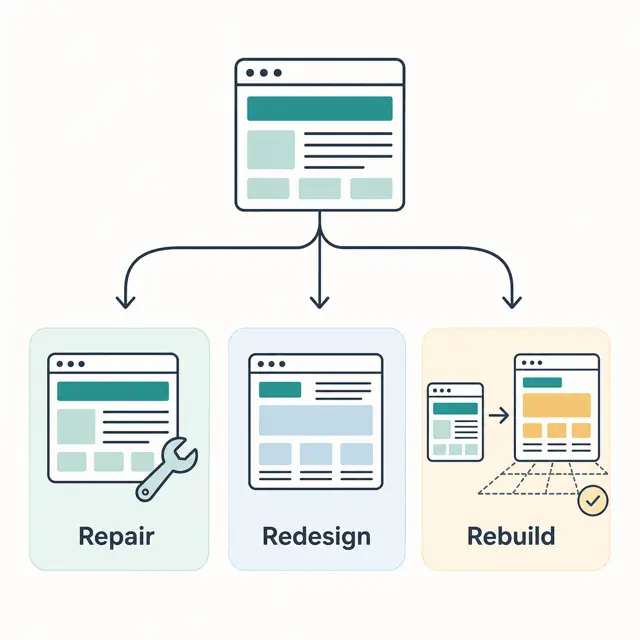
The short answer: repair, redesign or rebuild?
| Option | Best fit | Watch for |
|---|---|---|
| Repair | A few clear technical or content faults | Repeated patches on an unsupported platform |
| Redesign | Sound platform, weak layout or enquiry path | Changing the look without fixing the workflow |
| Rebuild | Structural, security, integration or maintenance limits | Losing working URLs, forms or tracking in the move |
Diagnose the current site before choosing a scope
Look at real tasks, not just the homepage. Can a customer understand the offer on a phone? Can they find the right service, trust the business and send a useful enquiry? Does the form arrive in the correct inbox? Can staff update prices, hours and project examples without calling a developer?
Then check the technical basics. Test important pages on mobile, send a safe test enquiry and inspect search traffic, indexed pages and broken links. Google's Web Vitals guidance treats loading performance, responsiveness and visual stability as separate measures. Those signals can expose a problem, but a single lab score does not decide whether the whole site needs replacing.
When a focused repair is enough
Keep the current site when its foundation is sound and the faults have clear boundaries. Typical repair work includes compressing oversized images, correcting page titles, fixing a broken form, improving a confusing service page, restoring analytics or making buttons easier to use on a phone.
A repair is also easier to verify. You can name the fault, make the change and test the same task again. Be cautious when each fix reveals another dependency, nobody can update the software safely, or the site relies on plugins and accounts that no one owns. At that point, another patch may only postpone the decision.
When to redesign on the current platform
A redesign makes sense when the content system and integrations still work but the presentation no longer fits the business. Perhaps the service mix has changed, visitors cannot tell what to do next, or the site looks acceptable on a laptop and falls apart on a phone.
Do not begin with colours and fonts. Map the main visitor journeys first: choosing a service, checking evidence, making contact or booking. Reuse accurate copy, working forms and useful pages. A good redesign changes the experience while avoiding an unnecessary platform migration.
When a rebuild is justified
Rebuild when the current platform blocks changes the business genuinely needs. That may include reliable enquiry routing, booking, customer logins, an external system integration, clear page templates or a maintenance process someone can actually own.
Security and privacy can also force the issue. A rebuild may be safer when the site cannot receive updates or nobody knows where submitted customer information is stored. New Zealand Privacy Principle 5 requires organisations to use safeguards reasonable in the circumstances against loss, misuse or unauthorised disclosure. The Office of the Privacy Commissioner's guidance is a useful starting point, although it is not a substitute for advice about your circumstances.
Protect what already works during a rebuild
A new design can look better and still leave the business worse off if the migration drops known pages, sends enquiries nowhere or removes measurement. Before changing anything, record the current URLs, titles, forms, integrations, analytics tags, search landing pages and domain settings. Decide which pages stay, which are replaced and where retired URLs should redirect.
Build and test the replacement before the cutover. Check canonical URLs, redirects, important assets and form delivery separately. Google's guide to changing website hosting without changing visible URLs recommends preparing the new infrastructure, starting the move, monitoring traffic and only then shutting down the old host. A migration that changes URLs needs an even more deliberate redirect plan.
Write a brief that produces useful quotes
A designer can scope the work more accurately when the brief describes the business problem rather than requesting a vague "modern website". Include:
- the services and locations that matter now;
- the main visitor types and the action each should take;
- forms, booking, payments or systems the site must connect to;
- pages, rankings, tracking and business email that must be preserved;
- who will approve content and maintain the site after launch.
Ask each supplier what they would keep, what they would replace and how they will test the result. If every answer starts with a new platform before anyone has inspected the current one, the diagnosis is missing.
What BuildAI checks before recommending a rebuild
BuildAI has delivered websites for different jobs: lead generation for a trade business, online booking for Virtual Reality Hire and live property-listing integration for Better Residential PM. These are visible on our projects page. The right structure depends on the workflow; one template would not serve all three well.
A useful review separates content, design, forms, search, hosting and integrations so a working part is not replaced by accident. If you are weighing up repairs against a new build, see our lead-capture website service or send us the current URL and the problem you want to solve. We can discuss the smallest credible scope without assuming that a rebuild is always the answer.
About the author: Nikolai Janetzke is the founder of BuildAI.nz. His public work includes business websites, Virtual Reality Hire's booking workflow and connected browser-based tools.
Source note: Technical and privacy guidance was checked against Google Search Central, web.dev and the New Zealand Office of the Privacy Commissioner on 1 August 2026. Product guidance and legal obligations can change, so confirm them for your own website and circumstances.
Need a second opinion on your current website?
Send us the URL and the business problem. We will start with what can be kept, not assume you need to rebuild everything.
Discuss My Website