
Custom software vs Xero or a job-management app: what does your business need?
Choose Xero when you need accounting software, consider a job-management app when you need to organise day-to-day work, and consider custom software when a specific process does not fit the tools you have tried. These options can work together; a custom quoting tool is not automatically a replacement for your accounts.
For a small New Zealand service business, the choice starts with the work you need to do. Are you trying to keep the books, schedule jobs, or get a straightforward quote out without entering everything twice?
Xero, job-management software and custom software do different jobs
Xero's accounting software covers financial administration, including invoicing and bank reconciliation. If those are the problems you need to solve, evaluate accounting software first and involve your accountant where appropriate.
Job-management software focuses on running the work. Depending on the product, that might include quoting, scheduling, assigning staff and tracking jobs. Some products connect to accounting software: the Xero App Store's construction and trades category lists examples. Check the particular app's features and integration rather than assuming everything carries across.
Custom software makes sense when you have a clear process that packaged tools make unnecessarily awkward. It can give the owner fewer screens and a workflow that matches the business, but someone still needs to maintain it, protect the data and support changes.
Before commissioning an app, try the existing tools against a real job. If they do what you need with sensible setup, buying them may be the better decision. A custom app needs a more specific reason than wanting to avoid a subscription.
Why Groundworks chose a smaller quoting and invoicing tool
Groundworks is a practical example of that decision, not a claim that custom software is better for every business.
BuildAI created a website, logo and Google Ads setup for Groundworks Mowing & Property Care, then built a simple quoting and invoicing tool around the owner's day-to-day work. The aim was to help the business attract enquiries without making the admin that follows them harder.
The custom tool lets the owner enter clients, select mowing services, set prices, send quotes, turn quotes into invoices, track payment status and manage repeat jobs with a clear step to create the invoice. It follows a straightforward process rather than asking him to learn a larger software package just to get a quote out.
That extra conversation about admin changed what we built.
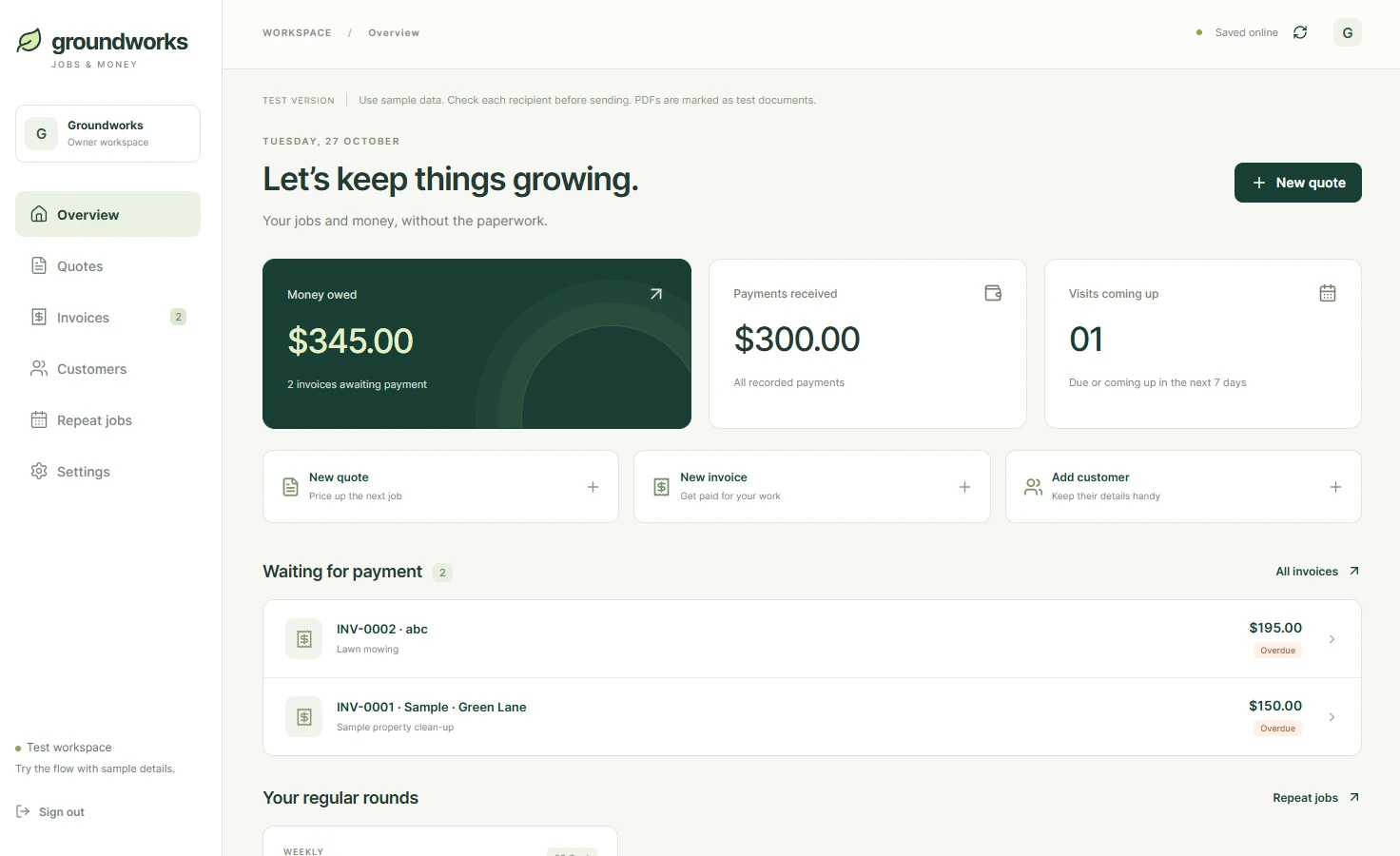
The Groundworks brief started with a website, logo and Google Ads
Groundworks Mowing & Property Care serves Rotorua and surrounding areas, with services covering lifestyle blocks, larger residential properties and commercial grounds, as well as home lawns.
The initial requirement was clear: create a new website and logo, and set up Google Ads for the mowing business.
Those pieces have different jobs. The logo gives the business a recognisable identity. The website explains the services and gives prospective customers a way to enquire. Google Ads provides a paid route for reaching people searching for relevant work.
But an enquiry is only the beginning. Someone still has to work out the scope, prepare a quote, invoice the job and keep track of whether the customer has paid.
As we talked through that process, the owner explained that he did not particularly enjoy quoting or invoicing. He also did not want to set up additional software, such as Xero, simply to handle the admin he needed at that stage.
Building a website without considering that would have left an important part of the job unfinished.
Keep the quoting process simple
The owner needed a practical way to manage a mowing job through to payment. He wanted fewer steps, a minimal design and a process that made sense to him.
We built a custom tool around those requirements. The starting point was the work itself: who is the client, what needs mowing, what is included, and how much will it cost?
For this project, simplicity meant leaving things out as well as adding useful features. A screen full of options would have worked against the reason for building it.
This is where custom business software can be useful. A small application can focus on a particular workflow rather than trying to cover every possible business need. That does not make custom software the right choice for everyone, but it suited the problem we were solving here.
How the mowing quote-to-invoice process works
The Groundworks tool keeps the main admin steps together:
- Enter the client. Add the customer details needed for the quote and invoice.
- Select the work. Tick the relevant mowing options and specify whether extras, such as weed eating, are included.
- Set the price and send the quote. Make the proposed work and cost clear to the customer.
- Turn the quote into an invoice. Carry the quoted details forward rather than preparing the same information again.
- Track payment status. Keep a record of whether the invoice has been paid.
- Manage repeat jobs. Keep regular work organised and use the “Done → Invoice” action when the visit is complete.
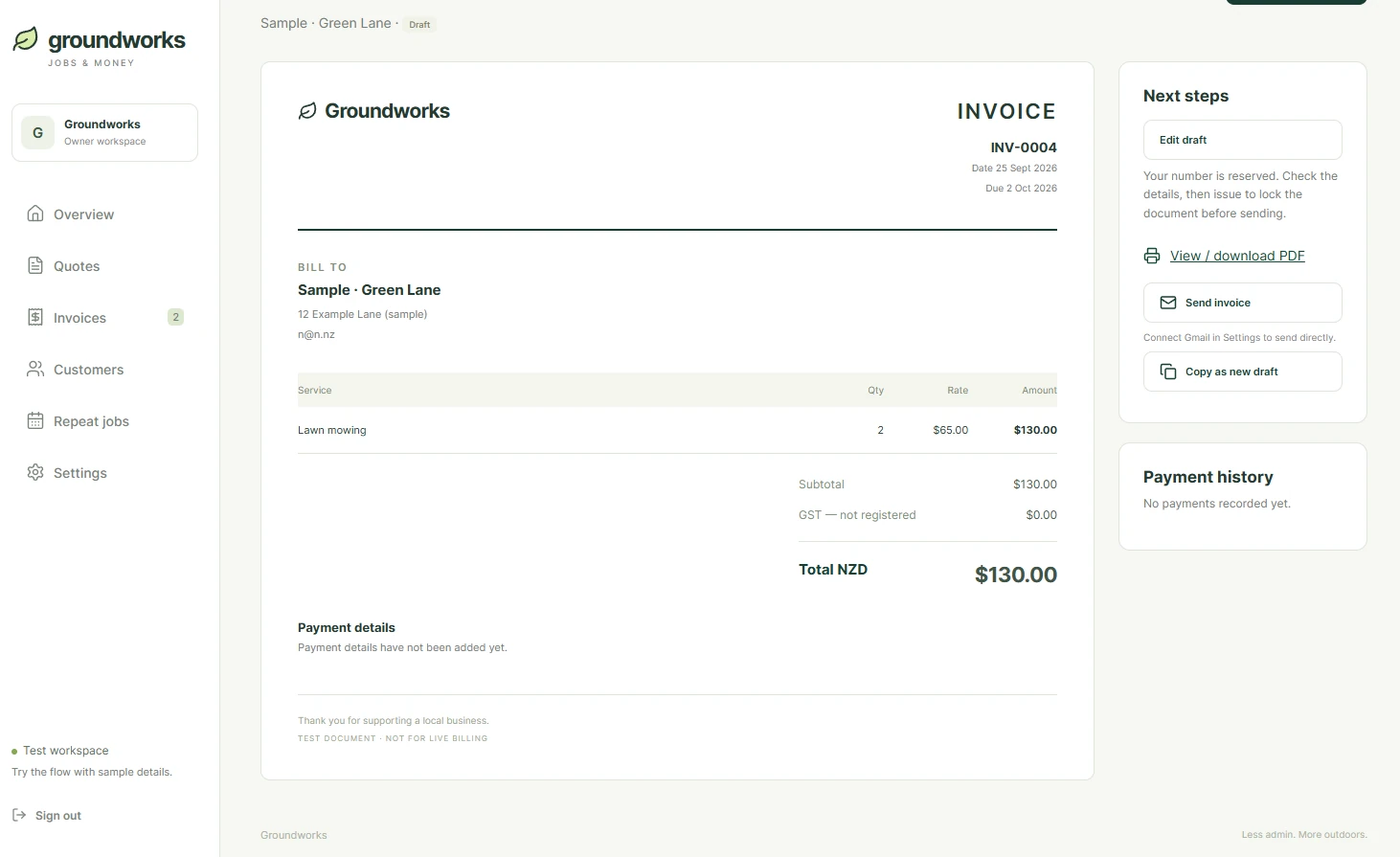
The detail about weed eating might seem small. For a mowing business, it matters. A customer needs to understand whether the price covers mowing alone or additional trimming, and the owner needs an easy way to specify that.
Those ordinary details are what make a tool useful. The software should match how the business describes and prices its work.
Payment tracking also has a clear boundary: recording an invoice as paid is different from automatically checking a bank account. We are describing the payment-status workflow here, not claiming a bank integration.
Repeat mowing jobs: mark the work done, then create the invoice
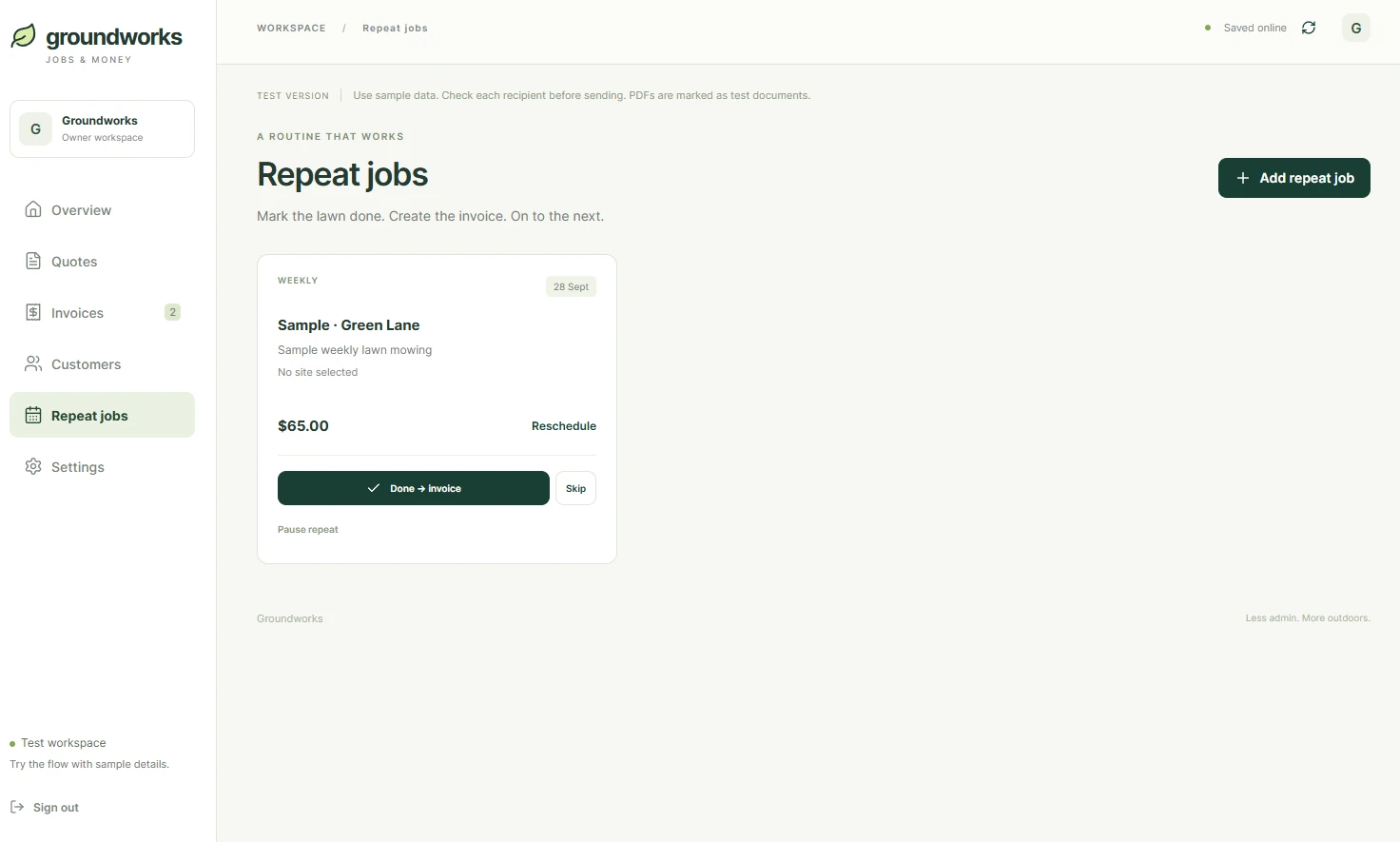
Regular maintenance creates repeated admin. When a customer has an ongoing arrangement, rebuilding the same job and invoice each time adds another task to remember.
The Groundworks repeat-jobs screen keeps the next visit and agreed price together. The owner has a clear “Done → Invoice” action, alongside options to reschedule, skip a visit or pause the repeat job.
That is a better fit for outdoor work than assuming every scheduled visit happened. Weather changes, customers postpone work and some lawns do not need cutting as often as others.
The workflow connects the completed job to the next admin step, so invoicing is easier to remember without taking the decision away from the owner. A repeat job is not a claim that an invoice has already been sent or a payment received.
That is the balance we look for with automation: remove repetition while keeping the owner in control of what the business charges for.
Compare the full cost, not just the subscription
We would not recommend building a custom application every time a business needs to send invoices.
An existing accounting or job-management package may already do the job well. It can be a better fit when a business needs broader reporting, accounting integrations or established processes across a larger team.
For Groundworks, the owner's preference was a smaller, more focused tool. He wanted to manage clients, quotes and invoices without taking on more software than he felt he needed.
The comparison should include the full cost of each approach: initial setup, subscriptions, hosting, support, maintenance and time spent using the system. Custom software is not maintenance-free, and it is not automatically cheaper.
A quoting and invoicing tool is also not necessarily a complete accounting system. Tax records, GST requirements and the information an accountant needs must still be considered separately.
What changed for Groundworks?
The project grew from a marketing brief into a website and a practical business tool.
The owner now has a simpler process for preparing quotes, turning them into invoices and keeping track of payments. The repeat-jobs workflow reduces repeated admin for ongoing work, while the focused design avoids the complexity of a broader package he did not want to adopt.
For this client's requirements, the focused tool also reduced ongoing software costs. That is a project-specific outcome, not a promise that custom software will cost less for another business.
The useful outcome is specific: a mowing business has a tool built around the admin its owner needs to do.
Start with the job you keep putting off
For another small business, the starting point might be a quote that takes too long, customer details entered twice, or invoices that are easy to forget after a busy week.
Before choosing software, write down that process. Identify what repeats, what needs a decision and which steps the owner still needs to approve. Then compare a simpler manual process, an existing app and a custom tool.
Groundworks started by asking for a website. Taking time to understand the work behind it gave us a better brief.
If your business needs a website and has an admin task you keep putting off, talk to BuildAI about the process. We can help work out whether an existing tool, a small automation or custom software is the sensible next step.